Buglet: A Colorful Font for Creative Web Design
As a web designer, I'm always on the lookout for fonts that bring personality to a site without sacrificing usability. Buglet is one of those rare finds—a full-color SVG font that adds playful charm while maintaining clarity. I tested it in several real-world web projects, and it quickly became a go-to for headers, buttons, and visual accents.
First Impressions: A Playful Yet Professional Typeface
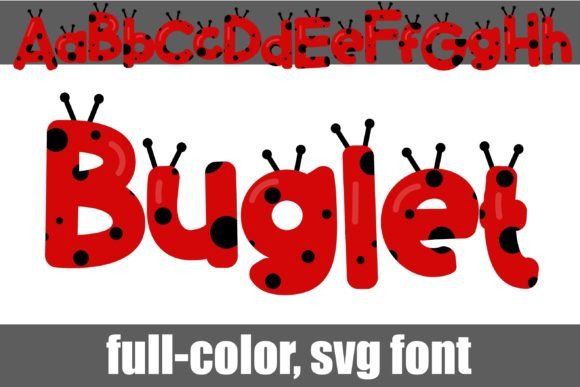
When I first installed Buglet, I was struck by its unique design. It’s a simple sans serif with ladybug spots and antennae, giving it a whimsical yet sophisticated feel. The color is embedded directly into the font, so there’s no need for separate images or overlays. This makes it ideal for digital assets where consistency and performance matter.
I used Buglet for a creative portfolio header, and it instantly elevated the look. The ladybug details add a touch of fun without being overwhelming. It works well in both light and dark mode, which is essential for responsive design.
Using Buglet in Website Headers and Hero Sections
One of my favorite uses for Buglet is in hero sections. Its bold, colorful presence draws attention without competing with other elements. I tested it on a boutique online store landing page, where it served as the main headline. The font stood out against a background image, making the message clear and engaging.
It also pairs well with clean, modern sans serifs. For example, using Buglet for a heading and a simple serif font for body text creates a balanced, professional look. This combination is great for blogs, course pages, and product landing pages.
Responsive Design and Mobile Usability
On mobile devices, Buglet holds up surprisingly well. The details are sharp, and the font remains readable even at smaller sizes. I used it for a call-to-action button on a coaching website, and it looked great on both desktop and smartphone screens.
However, I noticed that very small text, like navigation labels or form inputs, can become too detailed. In those cases, it’s better to stick with a simpler font. Buglet shines best when used for larger, more prominent text elements.
Brand Identity and Visual Consistency
For a new online store, I incorporated Buglet into the brand identity. It appeared in the logo, headers, and promotional banners. The consistent use of the font helped reinforce the brand’s personality—friendly, creative, and approachable.
It also worked well in social media graphics and email templates. The embedded color ensures that the font looks the same across different platforms, which is crucial for maintaining a cohesive brand image.
Font Pairing and Design Flexibility
Pairing Buglet with other fonts opens up a lot of creative possibilities. I tried it with a classic serif font for a blog header and found that the contrast added visual interest without clutter. On a product landing page, I paired it with a bold sans serif for headings and a thin sans serif for subheadings, creating a clean, organized layout.
For a more editorial feel, I used Buglet alongside a handwritten font in a digital magazine template. The mix of styles gave the design a handmade, personal touch that resonated with the audience.
Considerations for Web Use
While Buglet is a standout font, it’s important to consider its limitations. It’s not ideal for long paragraphs or dense text blocks. For body copy, a simpler font will ensure readability and accessibility.
Also, make sure to check the font’s licensing before using it on commercial websites or client projects. Buglet supports multiple weights and alternates, which is helpful for customizing the look across different sections of a site.
Overall, Buglet is a versatile and visually appealing font that brings a unique energy to web design. Whether you’re building a creative portfolio, launching an online store, or designing a marketing campaign, it’s a great choice for adding character and clarity to your digital projects.